


Omada
4.48.18K Reviews
App Specs
- Version
- 26.29.0
- Updated On
- License
- Free
- Downloads
- 500,000+
- Developer
- Omada Health
- Categories
- Medical
- Platform
- Android, iOS
Screenshots
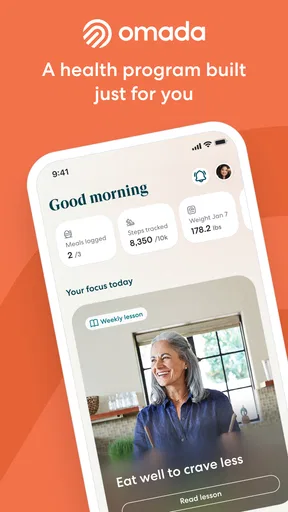

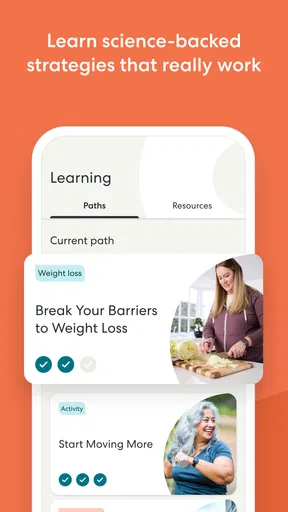
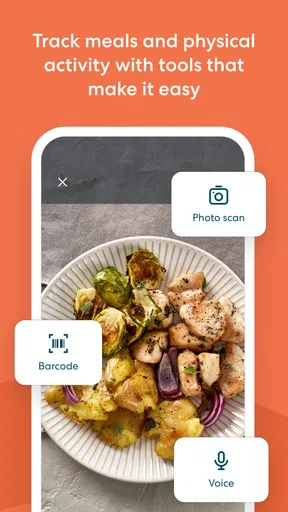

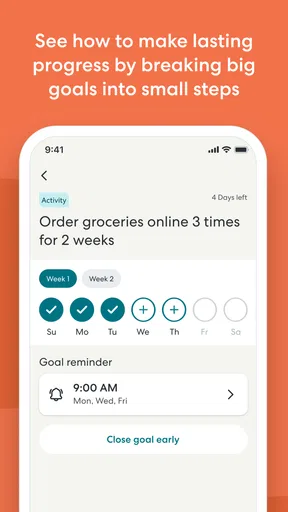
 Analysis by AppCompare
When I judge a health app, I care less about how quickly it opens than about whether it makes the next useful step easy to take. Omada is a medical app from Omada Health, and its role is to support participation in a guided health program. That makes it different from a general-purpose activity tracker: the app is most relevant when you want structure and ongoing engagement, rather than a blank dashboard waiting for you to decide what to do.
What “fast” means for a guided health app
I would set realistic expectations about speed here. A program app can feel responsive when it gets you back to a lesson, check-in, or progress view without fuss, but its value is not measured by how many screens you can race through. The useful test is whether you can fit a small health task into the spaces already available in your day. A quick pause between errands, for example, is a better moment for a short lesson than a plan that requires a long, uninterrupted session.
That distinction also helps explain who may enjoy this approach. If you like having a defined program to return to, Omada has a clearer purpose than a generic wellness journal. If you prefer to build your own system from separate tools, such as a food log, activity tracker, and notes app, the guided format may feel like an extra layer rather than a shortcut.
Making the program work around real life
A realistic routine might be to check in after breakfast, do a lesson during a quiet lunch break, and take stock of the day in the evening. I would avoid trying to complete every available task in one sitting. The more practical approach is to choose a repeatable moment and let that become the cue for opening the app. That can make engagement feel less like another obligation and more like part of an existing habit.
For a busy week, the trade-off is clear: guidance can reduce the effort of deciding what to focus on, but a program still asks for attention and follow-through. If your schedule changes constantly, it may help to use a flexible time window rather than relying on an exact daily routine. A missed session should not become a reason to abandon the whole plan; return when you have a moment and continue from there.
How it differs from standalone trackers
Compared with a basic step counter or calorie logger, Omada is better understood as a program companion rather than a tool for collecting numbers alone. A tracker can be handy when you want a quick record of movement or meals with minimal coaching. A structured health program is more suitable when you want prompts and a sense of progression. Neither approach is automatically better: the right choice depends on whether you want to interpret your own data or prefer a guided path.
I would also be careful not to treat an app as a replacement for professional medical care. A digital program can help organize habits and keep you engaged, but personal symptoms, treatment decisions, or changes to prescribed care belong in a conversation with a qualified health professional. That boundary matters especially in a medical category, where encouragement and clinical advice are not the same thing.
Worth Reading Before You Choose

EA SPORTS FC Mobile 26 Is a Bigger Football Game, but It Takes Time

Flipboard Shows What News Apps Must Do Beyond the Feed

Switching to Android Auto Means Rethinking Your Driving Routine

Google Calendar Makes a Crowded Week Easier to Manage

Ludo King Makes the Most of the Minutes Between Plans

Baby Panda World Brings Quick Play to Modern Phones, but Its Game Library Feels Busy
Who should give it a closer look
Omada is most promising for someone who has access to a program and wants a convenient place to stay involved with it. It may suit people who find a self-directed tracker too easy to ignore, or who would rather follow a sequence than invent a new wellness routine every week. On the other hand, someone looking only for an offline step counter, a highly customizable spreadsheet-style log, or a free-form fitness planner may be happier with a simpler tool built specifically for that purpose.
Before relying on any health app, I would also check that the program available to you matches your needs and that you are comfortable entering the information it asks for. The app itself can support participation, but the experience is only worthwhile if the program’s goals and level of guidance make sense for your circumstances.
Getting Started with Omada
First off, getting started with Omada is pretty smooth. You download it, create an account, and you're off to the races. The app kicks off by asking a few questions about your health goals, habits, and lifestyle, so it can tailor a program just for you. I found this personalized approach super refreshing. It's like having a wellness coach in your pocket!
Features You’ll Love
One of the standout features of Omada is its focus on holistic health. It’s not just about losing weight or hitting the gym; Omada aims to build sustainable habits. The app provides daily lessons that are bite-sized and engaging. Whether you're learning about nutrition, stress management, or the importance of sleep, Omada keeps it interesting.
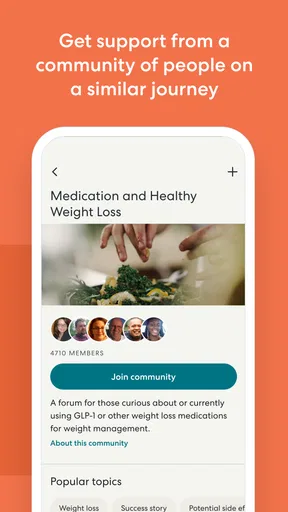
Another cool feature is the digital health coach. This isn't just some AI bot throwing generic advice at you. You actually get paired with a real person who checks in with you regularly. It's like having a cheerleader who knows your goals and is genuinely rooting for you. Plus, there’s a supportive community feature where you can connect with others on similar journeys. It’s like having a mini support group right there in the app.
Tracking and Tools
What’s a health app without some solid tracking tools, right? Omada doesn’t disappoint here. You can track your meals, activity, and weight effortlessly. The way it visualizes your progress is both motivating and easy to understand. I especially loved the integration with wearable devices—it syncs seamlessly with most fitness trackers, which means less manual input and more accurate data.
User Experience
Let’s talk about the user experience. The interface is clean and intuitive. You won’t find yourself lost in a sea of buttons and options. Everything is right where you’d expect it to be, which makes for a stress-free experience. The color palette is calming, which is a nice touch—after all, the app is about wellness, not just fitness.
Plus, the notifications are just the right amount. They’re gentle nudges to keep you on track, not annoying buzzes that make you want to throw your phone out the window. Trust me, that balance is key!
Personal Opinion
In my experience, Omada stands out because of its comprehensive approach. It's not just another calorie-counting app. It's about reshaping your lifestyle in a way that feels manageable and even enjoyable. The real game-changer for me was the human touch—the health coach and community really made a difference in keeping me engaged.
Of course, like any app, it has its quirks. Sometimes the lessons can feel a bit too basic if you're already well-versed in health and wellness. But for someone just starting out or looking for a structured plan, it's pretty spot-on.
As a free app rated for Everyone, it is easy to consider trying, though a program’s usefulness will depend on whether its guidance fits your goals. Omada has an average rating of 4.4 from around 26,000 ratings, with over 500,000 installs. Its current version is 26.18.0, and it supports devices running Android 8.0 or later. Those figures suggest it has reached a substantial audience, but I would still judge it by whether its approach suits your routine, not by popularity alone.
For day-to-day reliability, I would focus on whether the app is available when you have time to engage and whether your progress remains easy to follow. No app can make a health routine perfectly consistent, and a phone update, a changed schedule, or a temporary loss of attention can interrupt even a well-designed plan. A useful personal safeguard is to keep the next small action in mind—such as returning to a lesson or recording a check-in—rather than expecting the app to carry the habit for you.
Device constraints matter, too. The Android minimum is version 8.0, so users on older phones should check compatibility before planning around it. On a supported device, the practical question is less about raw processing power and more about whether using a phone suits your routine. If you dislike entering details on a small screen, or if you prefer to keep health tasks away from your phone, a paper log or a simpler wearable-centered option may be more comfortable.
One useful way to avoid friction is to keep the app’s role narrow: use it for the program and its guidance, rather than expecting it to replace every health tool you already use. If you are already tracking activity elsewhere, decide which record you will treat as your main reference. That small choice can prevent duplicated effort and make it easier to notice patterns without turning wellness into constant data entry.
Overall, if you’re on the lookout for a health app that offers more than just exercise tips, Omada is worth checking out. It’s got a personal touch that makes the journey feel less like a chore and more like an exciting adventure toward a healthier you.
Ready to give it a go? You can find it on both Android and iOS, and trust me, your future self might just thank you for it!
Pros
- User-friendly interface enhances navigation.
- Real-time updates keep you informed instantly.
- Customizable notifications for tailored alerts.
- Social features encourage community interaction.
- Wide variety of sports and leagues to follow.
Cons
- Occasional delays in live score updates.
- Limited customization for notification sounds.
- Some features require premium subscription.
- Ads can be intrusive during app usage.
- App may drain battery faster on older devices.
FAQs for Omada
What is Omada and how does it work?
Omada is a team-based sports prediction app that allows users to participate in virtual leagues and predict outcomes of real-world matches. Users can join teams, make predictions on various sports events, and earn points based on their accuracy. The app combines social interaction with competitive gameplay, making it a fun way to engage with sports.
Is Omada free to use, and are there any in-app purchases?
Omada is free to download and use. However, it may offer in-app purchases that enhance the user experience, such as premium league access or additional customization options. While the core functionalities are accessible without cost, these purchases can provide added benefits and features for avid users.
Which sports are available for predictions in Omada?
Omada covers a wide range of popular sports, including football, basketball, tennis, and more. The app frequently updates its roster of sports events, allowing users to engage with their favorite sports and stay current with ongoing leagues and tournaments. This variety ensures there's something for every sports enthusiast.
How does Omada ensure fair play and prevent cheating?
Omada has implemented several measures to ensure fair play, including real-time updates and secure data management. Users' predictions are locked in before events start, and the app uses reliable data sources to determine outcomes. Additionally, community guidelines and reporting features help maintain a fair and enjoyable environment for all participants.
Can I connect with friends on Omada and form teams?
Yes, Omada encourages social interaction by allowing users to connect with friends and form teams. You can invite friends to join your league or compete against them in various challenges. This feature enhances the competitive aspect of the app while fostering a sense of community among sports fans.


